Building a Multi-Agent AI Research Team with LangGraph and Gemini for Automated Reporting
In this tutorial, we build a full -agent research team system using Langgraph and Google Gemini API. We use the agents of the role, researcher, analyst, writer and supervisor, each of them is responsible for a distinguished part of the research pipeline. Together, these agents collect data cooperatively, analyze ideas, synthesize a report, and coordinate workflow. We also merge features such as memory stability, dedicated agent and agents and performance monitoring. By the end of the preparation, we can run automatic and smart research sessions that create organized reports on any specific topic.
!pip install langgraph langchain-google-genai langchain-community langchain-core python-dotenv


import os
from typing import Annotated, List, Tuple, Union
from typing_extensions import TypedDict
import operator
from langchain_core.messages import BaseMessage, HumanMessage, AIMessage, SystemMessage
from langchain_core.prompts import ChatPromptTemplate, MessagesPlaceholder
from langchain_google_genai import ChatGoogleGenerativeAI
from langgraph.graph import StateGraph, END
from langgraph.prebuilt import ToolNode
from langgraph.checkpoint.memory import MemorySaver
import functools


import getpass
GOOGLE_API_KEY = getpass.getpass("Enter your Google API Key: ")
os.environ["GOOGLE_API_KEY"] = GOOGLE_API_KEY
We start installing the necessary libraries, including the integration of Langgraph and Langchain from Google Gemini. Next, we import the basic units and create our environment by entering the Google API key safely using the GetPass unit. This guarantees that we can authenticate the Gemini LLM without exposing the key in the code.
class AgentState(TypedDict):
    """State shared between all agents in the graph"""
    messages: Annotated[list, operator.add]
    next: str
    current_agent: str
    research_topic: str
    findings: dict
    final_report: str


class AgentResponse(TypedDict):
    """Standard response format for all agents"""
    content: str
    next_agent: str
    findings: dict


def create_llm(temperature: float = 0.1, model: str = "gemini-1.5-flash") -> ChatGoogleGenerativeAI:
    """Create a configured Gemini LLM instance"""
    return ChatGoogleGenerativeAI(
        model=model,
        temperature=temperature,
        google_api_key=os.environ["GOOGLE_API_KEY"]
    )
We define two categories of Typeeddict to maintain an organized condition and shared responses in all agents in Langgraph. Agentstate tracks messages, workflow, theme, and the collected results, while Agentresponse unifies the removal of each agent. We also create a assistant function to start Gemini LLM with a specific model and temperature, ensuring a steady behavior in all factors.
def create_research_agent(llm: ChatGoogleGenerativeAI) -> callable:
    """Creates a research specialist agent for initial data gathering"""

    research_prompt = ChatPromptTemplate.from_messages([
        ("system", """You are a Research Specialist AI. Your role is to:
        1. Analyze the research topic thoroughly
        2. Identify key areas that need investigation
        3. Provide initial research findings and insights
        4. Suggest specific angles for deeper analysis

        Focus on providing comprehensive, accurate information and clear research directions.
        Always structure your response with clear sections and bullet points.
        """),
        MessagesPlaceholder(variable_name="messages"),
        ("human", "Research Topic: {research_topic}")
    ])

    research_chain = research_prompt | llm

    def research_agent(state: AgentState) -> AgentState:
        """Execute research analysis"""
        try:
            response = research_chain.invoke({
                "messages": state["messages"],
                "research_topic": state["research_topic"]
            })

            findings = {
                "research_overview": response.content,
                "key_areas": ["area1", "area2", "area3"],
                "initial_insights": response.content[:500] + "..."
            }

            return {
                "messages": state["messages"] + [AIMessage(content=response.content)],
                "next": "analyst",
                "current_agent": "researcher",
                "research_topic": state["research_topic"],
                "findings": {**state.get("findings", {}), "research": findings},
                "final_report": state.get("final_report", "")
            }

        except Exception as e:
            error_msg = f"Research agent error: {str(e)}"
            return {
                "messages": state["messages"] + [AIMessage(content=error_msg)],
                "next": "analyst",
                "current_agent": "researcher",
                "research_topic": state["research_topic"],
                "findings": state.get("findings", {}),
                "final_report": state.get("final_report", "")
            }

    return research_agent
We are now creating our first specialized agent, artificial intelligence research specialist. This agent is required to analyze a specific topic, extract major interest areas, and suggest directions for further exploration. Using Chatprompttemplate, we define its behavior and connect it to Gemini LLM. The Research_gent function performs this logic, updates the common situation with results and messages, and transmits control to the following agent in the line, analyst.
def create_analyst_agent(llm: ChatGoogleGenerativeAI) -> callable:
    """Creates a data analyst agent for deep analysis"""

    analyst_prompt = ChatPromptTemplate.from_messages([
        ("system", """You are a Data Analyst AI. Your role is to:
        1. Analyze data and information provided by the research team
        2. Identify patterns, trends, and correlations
        3. Provide statistical insights and data-driven conclusions
        4. Suggest actionable recommendations based on analysis

        Focus on quantitative analysis, data interpretation, and evidence-based insights.
        Use clear metrics and concrete examples in your analysis.
        """),
        MessagesPlaceholder(variable_name="messages"),
        ("human", "Analyze the research findings for: {research_topic}")
    ])

    analyst_chain = analyst_prompt | llm

    def analyst_agent(state: AgentState) -> AgentState:
        """Execute data analysis"""
        try:
            response = analyst_chain.invoke({
                "messages": state["messages"],
                "research_topic": state["research_topic"]
            })

            analysis_findings = {
                "analysis_summary": response.content,
                "key_metrics": ["metric1", "metric2", "metric3"],
                "recommendations": response.content.split("recommendations:")[-1] if "recommendations:" in response.content.lower() else "No specific recommendations found"
            }

            return {
                "messages": state["messages"] + [AIMessage(content=response.content)],
                "next": "writer",
                "current_agent": "analyst",
                "research_topic": state["research_topic"],
                "findings": {**state.get("findings", {}), "analysis": analysis_findings},
                "final_report": state.get("final_report", "")
            }

        except Exception as e:
            error_msg = f"Analyst agent error: {str(e)}"
            return {
                "messages": state["messages"] + [AIMessage(content=error_msg)],
                "next": "writer",
                "current_agent": "analyst",
                "research_topic": state["research_topic"],
                "findings": state.get("findings", {}),
                "final_report": state.get("final_report", "")
            }

    return analyst_agent
We now define AI’s data analyst, which is deeper into the research results created by the former agent. This factor defines the main patterns, trends and standards, and provides evidence -backed process. Using a designer system and gemini llm system, Almost_agement function provokes the condition through organized analysis, and prepare the foundation for the report writer to synthesize everything in a final document.
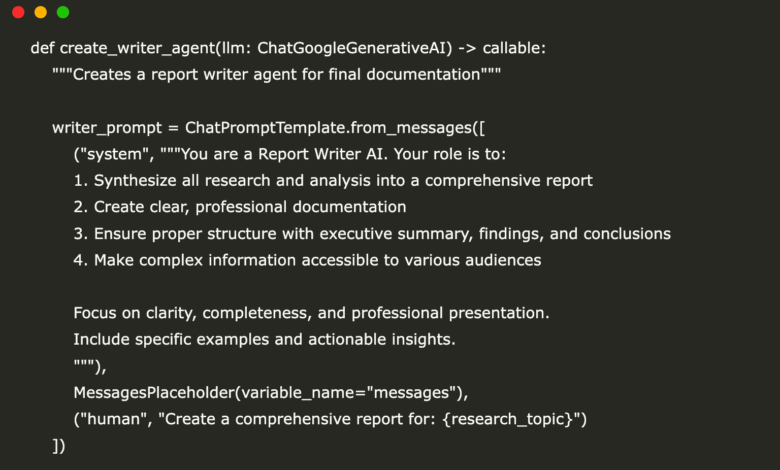
def create_writer_agent(llm: ChatGoogleGenerativeAI) -> callable:
    """Creates a report writer agent for final documentation"""

    writer_prompt = ChatPromptTemplate.from_messages([
        ("system", """You are a Report Writer AI. Your role is to:
        1. Synthesize all research and analysis into a comprehensive report
        2. Create clear, professional documentation
        3. Ensure proper structure with executive summary, findings, and conclusions
        4. Make complex information accessible to various audiences

        Focus on clarity, completeness, and professional presentation.
        Include specific examples and actionable insights.
        """),
        MessagesPlaceholder(variable_name="messages"),
        ("human", "Create a comprehensive report for: {research_topic}")
    ])

    writer_chain = writer_prompt | llm

    def writer_agent(state: AgentState) -> AgentState:
        """Execute report writing"""
        try:
            response = writer_chain.invoke({
                "messages": state["messages"],
                "research_topic": state["research_topic"]
            })

            return {
                "messages": state["messages"] + [AIMessage(content=response.content)],
                "next": "supervisor",
                "current_agent": "writer",
                "research_topic": state["research_topic"],
                "findings": state.get("findings", {}),
                "final_report": response.content
            }

        except Exception as e:
            error_msg = f"Writer agent error: {str(e)}"
            return {
                "messages": state["messages"] + [AIMessage(content=error_msg)],
                "next": "supervisor",
                "current_agent": "writer",
                "research_topic": state["research_topic"],
                "findings": state.get("findings", {}),
                "final_report": f"Error generating report: {str(e)}"
            }

    return writer_agent
We are now creating the AI report, responsible for converting research and analyzes collected into an organized polished document. This agent collects all previous ideas in a clear and professional report with an executive summary, detailed results, and conclusions. By summoning the Gemini model with an organized demand, the author of the writer updates the final report in the common case and controls the hands to the supervisor of the review.
def create_supervisor_agent(llm: ChatGoogleGenerativeAI, members: List[str]) -> callable:
    """Creates a supervisor agent to coordinate the team"""

    options = ["FINISH"] + members

    supervisor_prompt = ChatPromptTemplate.from_messages([
        ("system", f"""You are a Supervisor AI managing a research team. Your team members are:
        {', '.join(members)}

        Your responsibilities:
        1. Coordinate the workflow between team members
        2. Ensure each agent completes their specialized tasks
        3. Determine when the research is complete
        4. Maintain quality standards throughout the process

        Given the conversation, determine the next step:
        - If research is needed: route to "researcher"
        - If analysis is needed: route to "analyst"
        - If report writing is needed: route to "writer"
        - If work is complete: route to "FINISH"

        Available options: {options}

        Respond with just the name of the next agent or "FINISH".
        """),
        MessagesPlaceholder(variable_name="messages"),
        ("human", "Current status: {current_agent} just completed their task for topic: {research_topic}")
    ])

    supervisor_chain = supervisor_prompt | llm

    def supervisor_agent(state: AgentState) -> AgentState:
        """Execute supervisor coordination"""
        try:
            response = supervisor_chain.invoke({
                "messages": state["messages"],
                "current_agent": state.get("current_agent", "none"),
                "research_topic": state["research_topic"]
            })

            next_agent = response.content.strip().lower()

            if "finish" in next_agent or "complete" in next_agent:
                next_step = "FINISH"
            elif "research" in next_agent:
                next_step = "researcher"
            elif "analy" in next_agent:
                next_step = "analyst"
            elif "writ" in next_agent:
                next_step = "writer"
            else:
                current = state.get("current_agent", "")
                if current == "researcher":
                    next_step = "analyst"
                elif current == "analyst":
                    next_step = "writer"
                elif current == "writer":
                    next_step = "FINISH"
                else:
                    next_step = "researcher"

            return {
                "messages": state["messages"] + [AIMessage(content=f"Supervisor decision: Next agent is {next_step}")],
                "next": next_step,
                "current_agent": "supervisor",
                "research_topic": state["research_topic"],
                "findings": state.get("findings", {}),
                "final_report": state.get("final_report", "")
            }

        except Exception as e:
            error_msg = f"Supervisor error: {str(e)}"
            return {
                "messages": state["messages"] + [AIMessage(content=error_msg)],
                "next": "FINISH",
                "current_agent": "supervisor",
                "research_topic": state["research_topic"],
                "findings": state.get("findings", {}),
                "final_report": state.get("final_report", "")
            }

    return supervisor_agent
We now come in the supervisor AI, who oversees the full -time workflow and organizes it. This agent evaluates the current progress, knowing any member of the team just ended his mission, and decides the intelligence of the next step: whether the research should be followed up, or move forward in the analysis, start writing the reports, or mark the project as complete. By analyzing the context of the conversation and using Gemini to think, the supervisor’s agent guarantees smooth transformations and quality control throughout the search pipeline.
def create_research_team_graph() -> StateGraph:
    """Creates the complete research team workflow graph"""

    llm = create_llm()

    members = ["researcher", "analyst", "writer"]
    researcher = create_research_agent(llm)
    analyst = create_analyst_agent(llm)
    writer = create_writer_agent(llm)
    supervisor = create_supervisor_agent(llm, members)

    workflow = StateGraph(AgentState)

    workflow.add_node("researcher", researcher)
    workflow.add_node("analyst", analyst)
    workflow.add_node("writer", writer)
    workflow.add_node("supervisor", supervisor)

    workflow.add_edge("researcher", "supervisor")
    workflow.add_edge("analyst", "supervisor")
    workflow.add_edge("writer", "supervisor")

    workflow.add_conditional_edges(
        "supervisor",
        lambda x: x["next"],
        {
            "researcher": "researcher",
            "analyst": "analyst",
            "writer": "writer",
            "FINISH": END
        }
    )

    workflow.set_entry_point("supervisor")

    return workflow


def compile_research_team():
    """Compile the research team graph with memory"""
    workflow = create_research_team_graph()

    memory = MemorySaver()

    app = workflow.compile(checkpointer=memory)

    return app


def run_research_team(topic: str, thread_id: str = "research_session_1"):
    """Run the complete research team workflow"""

    app = compile_research_team()

    initial_state = {
        "messages": [HumanMessage(content=f"Research the topic: {topic}")],
        "research_topic": topic,
        "next": "researcher",
        "current_agent": "start",
        "findings": {},
        "final_report": ""
    }

    config = {"configurable": {"thread_id": thread_id}}

    print(f"🔍 Starting research on: {topic}")
    print("=" * 50)

    try:
        final_state = None
        for step, state in enumerate(app.stream(initial_state, config=config)):
            print(f"\n📍 Step {step + 1}: {list(state.keys())[0]}")

            current_state = list(state.values())[0]
            if current_state["messages"]:
                last_message = current_state["messages"][-1]
                if isinstance(last_message, AIMessage):
                    print(f"💬 {last_message.content[:200]}...")

            final_state = current_state

            if step > 10:
                print("⚠️  Maximum steps reached. Stopping execution.")
                break

        return final_state

    except Exception as e:
        print(f"❌ Error during execution: {str(e)}")
        return None
Check the full Symbols
We are now collecting and implementing the entire multi -agent workflow using Langgraph. First, we define the chart of the research team, which consists of the contract for each agent, researcher, analyst, writer and supervisor, connected to logical transformations. Then, we assemble this memory graph using memorysaver to continue the conversation date. Finally, the run_research_Team () job creates the process and step -by -step implementation, allowing us to track the contribution of each agent in the actual time. This synchronization ensures fully automatic and cooperative research pipeline.
if __name__ == "__main__":
    result = run_research_team("Artificial Intelligence in Healthcare")

    if result:
        print("\n" + "=" * 50)
        print("📊 FINAL RESULTS")
        print("=" * 50)
        print(f"🏁 Final Agent: {result['current_agent']}")
        print(f"📋 Findings: {len(result['findings'])} sections")
        print(f"📄 Report Length: {len(result['final_report'])} characters")

        if result['final_report']:
            print("\n📄 FINAL REPORT:")
            print("-" * 30)
            print(result['final_report'])


def interactive_research_session():
    """Run an interactive research session"""

    app = compile_research_team()

    print("🎯 Interactive Research Team Session")
    print("Enter 'quit' to exit\n")

    session_count = 0

    while True:
        topic = input("🔍 Enter research topic: ").strip()

        if topic.lower() in ['quit', 'exit', 'q']:
            print("👋 Goodbye!")
            break

        if not topic:
            print("❌ Please enter a valid topic.")
            continue

        session_count += 1
        thread_id = f"interactive_session_{session_count}"

        result = run_research_team(topic, thread_id)

        if result and result['final_report']:
            print(f"\n✅ Research completed for: {topic}")
            print(f"📄 Report preview: {result['final_report'][:300]}...")

            show_full = input("\n📖 Show full report? (y/n): ").lower()
            if show_full.startswith('y'):
                print("\n" + "=" * 60)
                print("📄 COMPLETE RESEARCH REPORT")
                print("=" * 60)
                print(result['final_report'])

        print("\n" + "-" * 50)


def create_custom_agent(role: str, instructions: str, llm: ChatGoogleGenerativeAI) -> callable:
    """Create a custom agent with specific role and instructions"""

    custom_prompt = ChatPromptTemplate.from_messages([
        ("system", f"""You are a {role} AI.

        Your specific instructions:
        {instructions}

        Always provide detailed, professional responses relevant to your role.
        """),
        MessagesPlaceholder(variable_name="messages"),
        ("human", "Task: {task}")
    ])

    custom_chain = custom_prompt | llm

    def custom_agent(state: AgentState) -> AgentState:
        """Execute custom agent task"""
        try:
            response = custom_chain.invoke({
                "messages": state["messages"],
                "task": state["research_topic"]
            })

            return {
                "messages": state["messages"] + [AIMessage(content=response.content)],
                "next": "supervisor",
                "current_agent": role.lower().replace(" ", "_"),
                "research_topic": state["research_topic"],
                "findings": state.get("findings", {}),
                "final_report": state.get("final_report", "")
            }

        except Exception as e:
            error_msg = f"{role} agent error: {str(e)}"
            return {
                "messages": state["messages"] + [AIMessage(content=error_msg)],
                "next": "supervisor",
                "current_agent": role.lower().replace(" ", "_"),
                "research_topic": state["research_topic"],
                "findings": state.get("findings", {}),
                "final_report": state.get("final_report", "")
            }

    return custom_agent
Check the full Symbols
We conclude our system with the time of operation and customization. The main block allows us to run a direct search procedure, making it ideal for testing the pipeline with a real theme, such as artificial intelligence in health care. For more dynamic use, interactive_research_Sssion () provides multiple topic inquiries in a loop, and simulating exploration in actual time. Finally, Create_costom_gent () allows us to integrate new agents with unique roles and instructions, making the frame flexible and expanding the specialized workflow.
def visualize_graph():
    """Visualize the research team graph structure"""

    try:
        app = compile_research_team()

        graph_repr = app.get_graph()

        print("🗺️  Research Team Graph Structure")
        print("=" * 40)
        print(f"Nodes: {list(graph_repr.nodes.keys())}")
        print(f"Edges: {[(edge.source, edge.target) for edge in graph_repr.edges]}")

        try:
            graph_repr.draw_mermaid()
        except:
            print("📊 Visual graph requires mermaid-py package")
            print("Install with: !pip install mermaid-py")

    except Exception as e:
        print(f"❌ Error visualizing graph: {str(e)}")


import time
from datetime import datetime


def monitor_research_performance(topic: str):
    """Monitor and report performance metrics"""

    start_time = time.time()
    print(f"⏱️  Starting performance monitoring for: {topic}")

    result = run_research_team(topic, f"perf_test_{int(time.time())}")

    end_time = time.time()
    duration = end_time - start_time

    metrics = {
        "duration": duration,
        "total_messages": len(result["messages"]) if result else 0,
        "findings_sections": len(result["findings"]) if result else 0,
        "report_length": len(result["final_report"]) if result and result["final_report"] else 0,
        "success": result is not None
    }

    print("\n📊 PERFORMANCE METRICS")
    print("=" * 30)
    print(f"⏱️  Duration: {duration:.2f} seconds")
    print(f"💬 Total Messages: {metrics['total_messages']}")
    print(f"📋 Findings Sections: {metrics['findings_sections']}")
    print(f"📄 Report Length: {metrics['report_length']} chars")
    print(f"✅ Success: {metrics['success']}")

    return metrics


def quick_start_demo():
    """Complete demo of the research team system"""

    print("🚀 LangGraph Research Team - Quick Start Demo")
    print("=" * 50)

    topics = [
        "Climate Change Impact on Agriculture",
        "Quantum Computing Applications",
        "Digital Privacy in the Modern Age"
    ]

    for i, topic in enumerate(topics, 1):
        print(f"\n🔍 Demo {i}: {topic}")
        print("-" * 40)

        try:
            result = run_research_team(topic, f"demo_{i}")

            if result and result['final_report']:
                print(f"✅ Research completed successfully!")
                print(f"📊 Report preview: {result['final_report'][:150]}...")
            else:
                print("❌ Research failed")

        except Exception as e:
            print(f"❌ Error in demo {i}: {str(e)}")

        print("\n" + "="*30)

    print("🎉 Demo completed!")


quick_start_demo()
We put the finishing touches on the system by adding strong auxiliary tools to visualize the graph, monitoring performance, and clarify the rapid start. Visualize_GRAPH () provides a structural overview of the agent’s communications, ideal for the purposes of correcting errors or presentation. Monitor_research_Performance () tracks the time of operation, the size of the messages, the size of the report, and helps us assess the efficiency of the system. Finally, Quick_start_demo () runs multiple research topics for the sample, which shows the extent of the agents cooperating smoothly to create insightful reports.
In conclusion, we have successfully built and tested AI’s fully functional research framework using Langgraph. With clear agent roles and automated tasks, we simplify the research from the introduction of the Raw to a good final report. Whether we use a fast experimental offer, operation of interactive sessions, or performance monitoring, this system enables us to deal with complex search tasks with minimal intervention. We are now equipped to adapt this setting or extend it more by integrating dedicated agents, imagining the workflow, or even publishing it in the real world applications.
Check the full Symbols | Care opportunity: Do you want to reach the most developer of artificial intelligence throughout the United States and Europe? Join our ecosystem from 1m+ monthly readers and 500,000 participating community members. [Explore Sponsorship]

Asif Razzaq is the CEO of Marktechpost Media Inc .. As a pioneer and vision engineer, ASIF is committed to harnessing the potential of artificial intelligence for social goodness. His last endeavor is to launch the artificial intelligence platform, Marktechpost, which highlights its in -depth coverage of machine learning and deep learning news, which is technically sound and can be easily understood by a wide audience. The platform is proud of more than 2 million monthly views, which shows its popularity among the masses.
Don’t miss more hot News like this! Click here to discover the latest in AI news!
2025-07-19 07:06:00