
Open-fit benefits aren’t enough to stand out
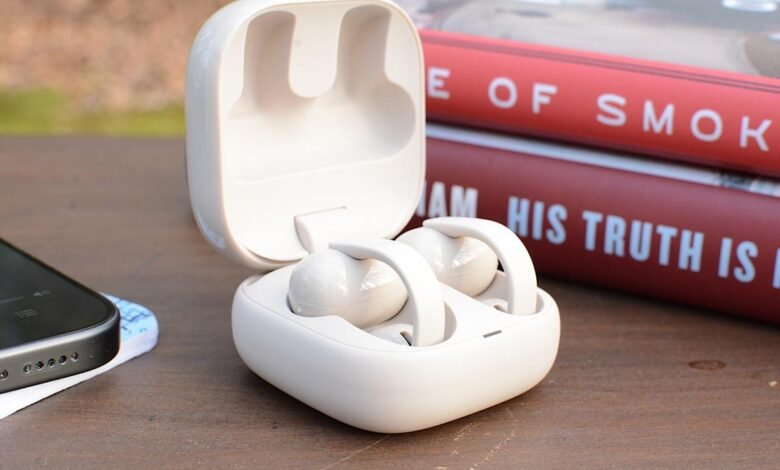
I distinctly remember when Bose announced the Ultra Open Earbuds. While I applaud the company for trying something different, I wasn’t sure if the clip design would take hold. Well, here we are, almost two years later, and most earphone makers now have something resembling a Bose fashion experience. You can now count Sony among those companies as the company today unveiled the LinkBuds Clip ($230) open earbuds.
These aren’t the first open-ear headphones in Sony’s LinkBuds lineup. The company has two generations of the LinkBuds Open (originally called just LinkBuds) under its belt, giving users a more traditional earbud that fits with donut-shaped drivers that let ambient sounds in. Now Sony is taking a cue from Bose and others by designing a clip that attaches securely and comfortably to the ear while leaving the ear canal unobstructed. The companies clearly believe that customers love this type of earbuds, but the challenge for Sony is to make the LinkBuds Clip unique among the growing list of alternatives.
Sony
Sony experimented with an open, clip-on design, but it didn’t do enough to set the LinkBuds Clip apart from the competition.
- Comfortable and open
- All-day battery life
- Responsive controls
- Basic features
- No wireless charging
- Subpar bass performance
- Battery life
Design and fit
Sony isn’t offering anything special in terms of design here, but that’s okay. To be fair, I didn’t see much innovation in terms of aesthetics in these clip-on earbuds. For the most part, they all have similar shapes: two cylindrical cases connected by a short, flexible cable. True to its predecessors, Sony placed the drivers in a squat housing while the bulk of the components are housed in a larger housing located behind the earlobe.
Sony kept the clip weight of the LinkBuds low, avoiding the bulk of the Ultra Open Earbuds. Both of these factors contribute to a very comfortable fit, so the IPX4-rated earbuds can easily be worn all day without becoming a burden. Although I didn’t need them, Sony included a pair of flexible silicone “fitting pads” in the box. They attach to the short, flat cable of the latest LinkBuds for a more secure fit. During my tests, the LinkBuds clip stayed in place well without them, but there was also no drop in comfort when I had them on.
The last design-related element I’ll mention is the touch controls. On the LinkBuds clip, the flat connector between the two housings accepts clicks for playback controls, volume changes, navigating through sound modes, and more. You can click along this area to make an edit, you don’t have to do it directly in the middle. The LinkBuds Clip was responsive during this review, completing the task quickly without lag or repetitive clicks. That is, except for the size, because you have to keep clicking for that change to happen.
LinkBuds clip features
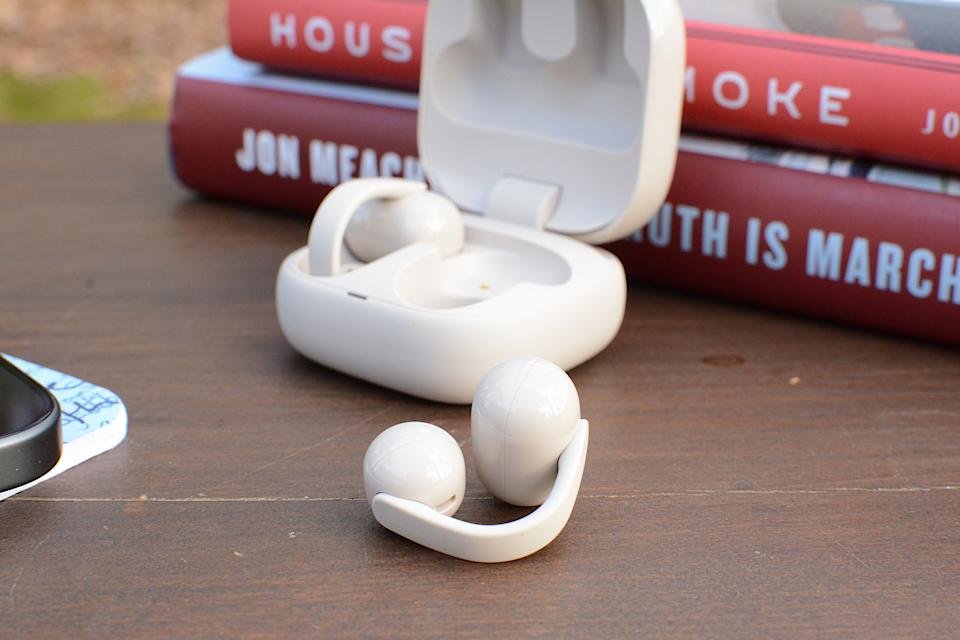
The controls are located along the connector between the two cylindrical housings (Billy Steele for Engadget)
Sony usually offers a full suite of features on its earbuds. Although they’re technically the company’s mid-range line, the LinkBuds family has a solid set of amenities that make them well-suited for both productivity and entertainment. Unfortunately, the LinkBuds Clip doesn’t have much to offer here. The company gives you the basics, like the ability to adjust click controls or customize EQ, and there’s also an Adaptive Audio tool that lets you customize settings based on activity or location (Sony calls it “scenes”). But there are some useful features I’ve come to expect from Sony that are noticeably absent.
The LinkBuds Clip doesn’t support Speak to Chat, Sony’s voice recognition feature that pauses audio and activates ambient sound when you start speaking. Quick Attention Mode, the widget that lowers the volume and lets in ambient sound for short conversations, isn’t here either. These earbuds don’t have wear detection, and you’ll have to settle for the regular DSEE sound upgrade instead of an enhanced version of that technology.
Sony has equipped the LinkBuds Clip with unique listening modes aimed at improving audio performance in two scenarios. First, Voice Boost increases the volume while you’re on a call or listening to podcasts or audiobooks. The company says this is designed for noisy environments where ambient sound is too loud. During my testing, I found the setting to be a massive boost in treble and boost in volume – something that’s certainly not well suited to music.
Then, sound leakage reduction technology restores high-pitched tones to avoid disturbing your neighbors in the office or coffee shop. To me, this is the opposite of Voice Boost, where the highs are removed for a heavier tuning of midrange and bass depth, but it doesn’t sound very good compared to the default setting. Plus, my family wasn’t really able to hear any leakage in the LinkBuds clip anyway, unless the volume was uncomfortably high. I’ll also note that any EQ customization/presets and DSEE upsampling are only available in standard (default) listening mode.
Sound and call quality
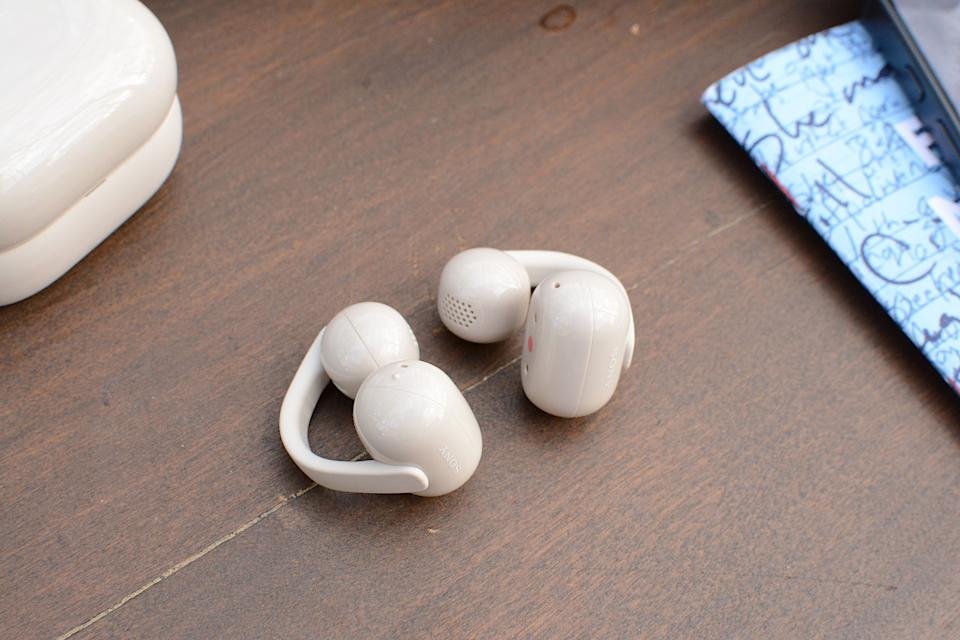
The LinkBuds clip has noise reduction technology and bone conduction for calls (Billy Steele for Engadget)
Open-ear headphones usually struggle to get a decent low-end tone, and the LinkBuds Clip suffers the same fate. However, it’s not all bad in the audio department, as these earbuds have great clarity and provide a solid soundstage so that the overall quality is not affected to the point of being unpleasant. The lack of bass is most evident in booming genres, such as hip-hop and heavy electronic beats.
The LinkBuds Clip doesn’t perform much better with more chaotic music styles like rock and metal. Spiritbox’s “Holy Roller” doesn’t have the depth it does in closed-ear headphones like the AirPods Pro 3 or over-ear headphones like Sony’s WH-1000XM6. As such, the band’s songs aren’t nearly as immersive or impactful without adequate amounts of bass. So, if pure, enveloping sound quality is your primary goal, you’ll want to look elsewhere, and you’ll want to tread carefully with any other open-type earbuds.
The open nature of the LinkBuds makes them well-suited for calls. Because your ears are not blocked, you can hear your voice clearly so you never feel the need to scream. Sony says these earbuds feature AI noise reduction technology and a bone conduction sensor for sound pickup, both of which should keep you sounding good. During this review, I found that background noise reduction worked well without making me seem overly processed. However, overall sound quality is average at best, which means you can still use it for calls, but there are better options if you really value clarity here.
Battery life on LinkBuds
When it comes to battery life, Sony says you can expect up to nine hours of use versus up to 37 hours when you factor in the case. This means that the LinkBuds clip alone is enough to get you through an entire workday, especially if you’re pausing for the occasional office chat or in-person meeting. And you’ll get more if you pop your earbuds into their case once or twice a day. If you find yourself with a depleted battery, a three-minute charge will give you an hour of playtime.
In multiple attempts at a full nine-hour run, I was unable to reach Sony’s advertised figure. In Standard mode with DSEE Upscaling set to Auto and the volume at about 60-70 percent, the LinkBuds lasted just over six hours. This time frame includes a mix of music, podcasts, and calls, which are typical workday activities.
Competition
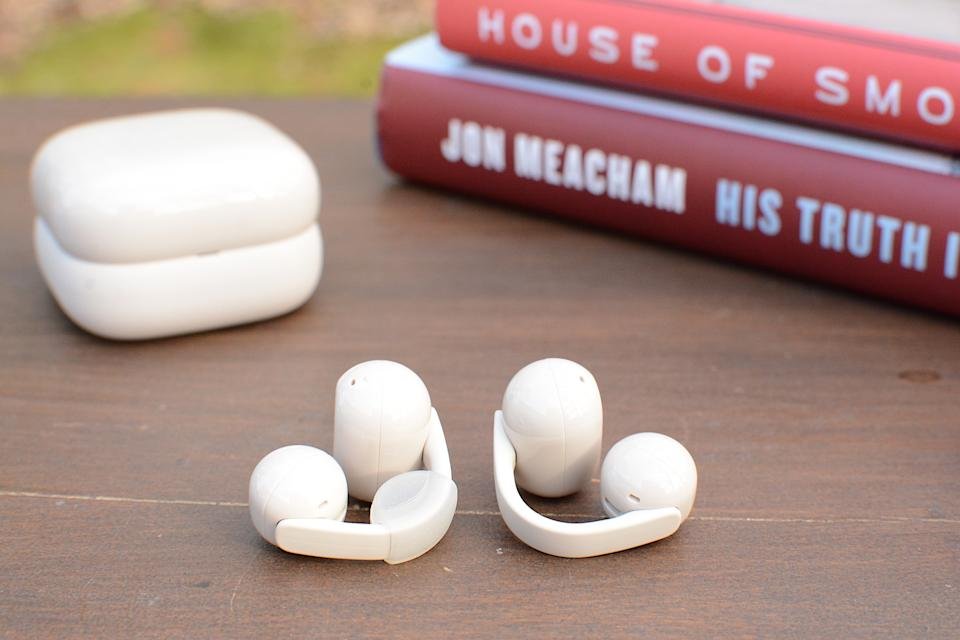
The included “stabilization pad” (left) can help with a secure fit (Billy Steele for Engadget)
Based on my testing, the Bose Ultra Open Earbuds are still the best in this emerging category. However, it is the largest and most expensive at $299. Although they offer all the benefits of open wear, sound quality can vary based on how well they fit your ears and the lack of multipoint Bluetooth technology may be a drawback for some.
If you’re hoping to pay less than the Bose or Sony, Anker’s Soundcore line offers the AeroClip for $170. Or if you’re on a really tight budget, JLab has the Flex Open Earbuds that are now only $40. JBL just announced a new $150 collection during CES as well, but it won’t be available until March. I’ve only given these two a casual listen without any in-depth testing, so I won’t make a final call on which one is better versus the LinkBuds Clip. But they’re also just three of the options currently available, and there are many more if none of them seem convincing.
Conclusion
The LinkBuds Clip expands Sony’s mid-range lineup with a completely different design that comes with inherent perks. They are very comfortable and take advantage of the benefits of open designs while performing basic earphone functions well. The sub-bass performance and omission of some of the Sony’s most attractive features (and even some basic ones) means the company hasn’t done enough to set the Clip apart from the competition in a clear way. These earbuds certainly work as intended without being too flashy or complicated, but there are plenty of other options that do, too.
Updated, January 21, 2026, 4:45 PM ET: After additional battery testing, I still couldn’t meet Sony’s promised nine hours. As a result, I adjusted the score from 72 to 70 to reflect performance in this area. I’ve also updated the battery life section with more detailed impressions.
Don’t miss more hot News like this! Click here to discover the latest in Technology news!
2026-01-21 16:00:00